
A hybrid Java/Clojure library designed to demonstrate how to setup Java interop using Maven
This is a complete Maven-first Clojure/Java interop application. It details how to create a Maven application, enrich it with clojure code, call into clojure from Java, and hook up the entry points for both Java and Clojure within the same project.
Further, it contains my starter examples of using the fantastic Incanter Statistical and Graphics Computing Library in clojure. I include both a pom.xml and a project.clj showing how to pull in the dependencies.
The outcome is a consistent maven-archetyped project, wherein maven and leiningen play nicely together. This allows the best of both ways to be applied together. For the emacs user, I include support for cider and swank. NRepl by itself is present for general purpose use as well.
Starting a project
Maven first
Create Maven project
follow these steps
mvn archetype:generate -DgroupId=com.mycompany.app -DartifactId=my-app -DarchetypeArtifactId=maven-archetype-quickstart -DinteractiveMode=false

cd my-app

mvn package

java -cp target/my-app-1.0-SNAPSHOT.jar com.mycompany.app.App
Hello World
Add Clojure code
Create a clojure core file
mkdir -p src/main/clojure/com/mycompany/app

touch src/main/clojure/com/mycompany/app/core.clj
Give it some goodness…
(ns com.mycompany.app.core
(:gen-class)
(:use (incanter core stats charts)))

(defn -main [& args]
(println "Hello Clojure!")
(println "Java main called clojure function with args: "
(apply str (interpose " " args))))

(defn run []
(view (histogram (sample-normal 1000))))
Notice that we’ve added in the Incanter Library and made a run function to pop up a histogram of sample data
Add dependencies to your pom.xml
<dependencies>
<dependency>
<groupId>org.clojure</groupId>
<artifactId>clojure</artifactId>
<version>1.7.0</version>
</dependency>
<dependency>
<groupId>org.clojure</groupId>
<artifactId>clojure-contrib</artifactId>
<version>1.2.0</version>
</dependency>
<dependency>
<groupId>incanter</groupId>
<artifactId>incanter</artifactId>
<version>1.9.0</version>
</dependency>
<dependency>
<groupId>org.clojure</groupId>
<artifactId>tools.nrepl</artifactId>
<version>0.2.10</version>
</dependency>
<!-- pick your poison swank or cider. just make sure the version of nRepl matches. -->
<dependency>
<groupId>cider</groupId>
<artifactId>cider-nrepl</artifactId>
<version>0.10.0-SNAPSHOT</version>
</dependency>
<dependency>
<groupId>swank-clojure</groupId>
<artifactId>swank-clojure</artifactId>
<version>1.4.3</version>
</dependency>
</dependencies>
Java main class
Modify your java main to call your clojure main like in the following:
package com.mycompany.app;

// for clojure's api
import clojure.lang.IFn;
import clojure.java.api.Clojure;

// for my api
import clojure.lang.RT;

public class App
{
public static void main( String[] args )
{

System.out.println("Hello Java!" );

try {

// running my clojure code
RT.loadResourceScript("com/mycompany/app/core.clj");
IFn main = RT.var("com.mycompany.app.core", "main");
main.invoke(args);

// running the clojure api
IFn plus = Clojure.var("clojure.core", "+");
System.out.println(plus.invoke(1, 2).toString());

} catch(Exception e) {
e.printStackTrace();
}

}
}
Maven plugins for building
You should add in these plugins to your pom.xml
  <plugin>
    <artifactId>maven-assembly-plugin</artifactId>
<configuration>
<descriptorRefs>
<descriptorRef>jar-with-dependencies</descriptorRef>
</descriptorRefs>
<archive>
<manifest>

<!-- use clojure main -->
<!-- <mainClass>com.mycompany.app.core</mainClass> -->

<!-- use java main -->
<mainClass>com.mycompany.app.App</mainClass>

</manifest>
</archive>
</configuration>
<executions>
<execution>
<id>make-assembly</id>
        <phase>package</phase>
        <goals>
<goal>single</goal>
</goals>
</execution>
</executions>
  </plugin>
Add this plugin to give your project the mvn: clojure:… commands
A full list of these is posted later in this article.
  <plugin>
    <groupId>com.theoryinpractise</groupId>
<artifactId>clojure-maven-plugin</artifactId>
<version>1.7.1</version>
<configuration>
<mainClass>com.mycompany.app.core</mainClass>
</configuration>
<executions>
<execution>
<id>compile-clojure</id>
        <phase>compile</phase>
        <goals>
<goal>compile</goal>
</goals>
</execution>
<execution>
<id>test-clojure</id>
        <phase>test</phase>
        <goals>
<goal>test</goal>
</goals>
</execution>
</executions>
  </plugin>
Add Java version targeting
This is always good to have if you are working against multiple versions of Java.
  <plugin>
    <groupId>org.apache.maven.plugins</groupId>
<artifactId>maven-compiler-plugin</artifactId>
<version>3.3</version>
<configuration><source>1.8</source>
<target>1.8</target>
</configuration>
  </plugin>
Add this plugin to give your project the mvn exec:… commands
The maven-exec-plugin is nice for running your project from the commandline, build scripts, or from inside an IDE.
  <plugin>
    <groupId>org.codehaus.mojo</groupId>
<artifactId>exec-maven-plugin</artifactId>
<version>1.4.0</version>
<executions>
<execution>
<goals>
<goal>exec</goal>
</goals>
</execution>
</executions>
<configuration>
<mainClass>com.mycompany.app.App</mainClass>
</configuration>
  </plugin>
With this plugin you can manipulate the manifest of your default package. In this case, I’m not adding a main, because I’m using the uberjar above with all the dependencies for that. However, I included this section for cases, where the use case is for a non-stand-alone assembly.
  <plugin>
    <groupId>org.apache.maven.plugins</groupId>
<artifactId>maven-jar-plugin</artifactId>
<version>2.6</version>
<configuration>
<archive>
<manifest>

<!-- use clojure main -->
<!-- <mainClass>com.mycompany.app.core</mainClass> -->

<!-- use java main -->
<!-- <mainClass>com.mycompany.app.App</mainClass> -->

</manifest>
</archive>
</configuration>
  </plugin>
mvn package
java -cp target/my-app-1.0-SNAPSHOT-jar-with-dependencies.jar com.mycompany.app.App
java -cp target/my-app-1.0-SNAPSHOT-jar-with-dependencies.jar com.mycompany.app.core
java -jar target/my-app-1.0-SNAPSHOT-jar-with-dependencies.jar
mvn exec:java
mvn exec:java -Dexec.mainClass="com.mycompany.app.App"
mvn exec:java -Dexec.mainClass="com.mycompany.app.core"
-Dexec.args="foo"
mvn clojure:run
mkdir src/test/clojure/com/mycompany/app

touch src/test/clojure/com/mycompany/app/core_test.clj
Add the following content:
(ns com.mycompany.app.core-test
(:require [clojure.test :refer :all]
[com.mycompany.app.core :refer :all]))

(deftest a-test
(testing "Rigourous Test :-)"
(is (= 0 0))))
mvn clojure:test
Or
mvn clojure:test-with-junit
Here is the full set of options available from the clojure-maven-plugin:
mvn ...

clojure:add-source
clojure:add-test-source
clojure:compile
clojure:test
clojure:test-with-junit
clojure:run
clojure:repl
clojure:nrepl
clojure:swank
clojure:nailgun
clojure:gendoc
clojure:autodoc
clojure:marginalia
See documentation:
touch project.clj
Add this content
(defproject my-sandbox "1.0-SNAPSHOT"
:description "My Encanter Project"
:url "http://joelholder.com"
:license {:name "Eclipse Public License"
:url "http://www.eclipse.org/legal/epl-v10.html"}
:dependencies [[org.clojure/clojure "1.7.0"]
[incanter "1.9.0"]]
:main com.mycompany.app.core
:source-paths ["src/main/clojure"]
:java-source-paths ["src/main/java"]
:test-paths ["src/test/clojure"]
:resource-paths ["resources"]
:aot :all)
Note that we’ve set the source code and test paths for both java and clojure to match the maven-way of doing this.
This gives us a consistent way of hooking the code from both lein and mvn. Additionally, I’ve added the incanter library here. The dependency should be expressed in the project file, because when we run nRepl from this directory, we want it to be available in our namespace, i.e. com.mycompany.app.core
lein run
lein test
Running with org-babel
This blog entry was exported to html from the README.org of this project. It sits in the base directory of the project. By using it to describe the project and include executable blocks of code from the project itself, we’re able to provide working examples of how to use the library in it’s documentation. People can simply clone our project and try out the library by executing it’s documentation. Very nice..
Make sure you jack-in to cider first:
M-x cider-jack-in (Have it mapped to F9 in my emacs)
Clojure code
The Clojure code block
#+begin_src clojure :tangle ./src/main/clojure/com/mycompany/app/core.clj :results output
  (-main)
  (run)
#+end_src
Blocks are run in org-mode with C-c C-c
(-main)
(run)
Hello Clojure!
Java main called clojure function with args:
Note that we ran both our main and run functions here. -main prints out the text shown above. The run function actually opens the incanter java image viewer and shows us a picture of our graph.
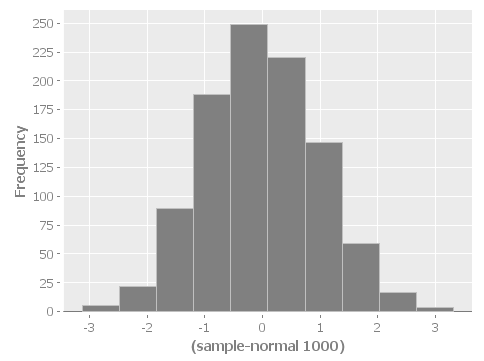
I have purposefully not invested in styling these graphs in order to keep the code examples simple and focussed, however incanter makes really beautiful output. Here’s a link to get you started:
Playing with Incanter
(use '(incanter core charts pdf))
;;; Create the x and y data:
(def x-data [0.0 1.0 2.0 3.0 4.0 5.0])
(def y-data [2.3 9.0 2.6 3.1 8.1 4.5])
(def xy-line (xy-plot x-data y-data))
(view xy-line)
(save-pdf xy-line "img/incanter-xy-line.pdf")
(save xy-line "img/incanter-xy-line.png")
PNG

Resources
Finally here are some resources to move you along the journey. I drew on the links cited below along with a night of hacking to arrive a nice clean interop skeleton. Feel free to use my code available here:
https://github.com/jclosure/my-app
For the eager, here is a link to my full pom:
Org-babel clojure
Org-scraps
Project setup
Working with Apache Storm (multilang)
Starter project:
This incubator project from the Apache Foundation demos drinking from the twitter hose with twitter4j and fishing in the streams with Java, Clojure, Python, and Ruby. Very cool and very powerful..
https://github.com/apache/storm/tree/master/examples/storm-starter
Testing Storm Topologies in Clojure:
http://www.pixelmachine.org/2011/12/17/Testing-Storm-Topologies.html
Vinyasa
READ this to give your clojure workflow more flow
Wrapping up
Clojure and Java are siblings on the JVM; they should play nicely together. Maven enables them to be easily mixed together in the same project or between projects. For a more indepth example of creating and consuming libraries written in Clojure, see Michael Richards’ article detailing how to use Clojure to implement interfaces defined in Java. He uses a FactoryMethod to abstract the mechanics of getting the implementation back into Java, which make’s the Clojure code virtually invisible from an API perspective. Very nice. Here’s the link:
http://michaelrkytch.github.io/programming/clojure/interop/2015/05/26/clj-interop-require.html
Happy hacking!..