Loading Scripts As Strings into the DOM with JQuery

Here’s why JavaScript is teh awsome:

var ns = {};
$(document).ready(function () {
$(‘<scrip’+’t>ns.blah=function(){alert(“hi”);};</scr’+’ipt>’)
.appendTo(‘body’);
ns.blah();
});

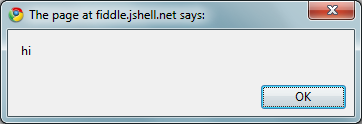
With this I get:

image

Here play with it yourself.

http://www.jsfiddle.net/nVuNZ/

Consider the deployment and update scenarios enabled using this technique with a modular application pattern.

DataBinding JS Objects Into HTML Forms With jquery-datalink and jquery-tmpl

Till now chain.js has been my favorite light touch templating and data-linking library. Today finally the official JQuery templating, data-linking, and globalization plugins are here.

The new plugins are very simple to use and nicely fill 2 very important gaps that really needed officially supported solutions, namely templating and datalinking. I’ll show you a little bit of the goodness you can quickly compose using these features together.  Here’s an example showing how a company object and a form representing a company can be bound together with minimal effort.

<html>

    <head>

        <title>Demo</title>

        <script src="../../jquery-datalink/jquery.js" type="text/javascript"></script>

        <script src="../../jquery-tmpl/jquery.tmpl.js" type="text/javascript"></script>

        <script src="../../jquery-datalink/jquery.datalink.js" type="text/javascript"></script>


        <script type="text/javascript">


            $(document).ready(function () {


                var company = { companyName: ‘ABC’, companyPhone: ‘(555) 555-5555’ };


                $("#companyDetail")

                    .tmpl(company)                //render object into form template

                    .link(company)                //link object to form fields

                    .appendTo("#renderTarget")    //place the rendered template into the DOM

                    .find("#saveCompany").click(function (evt) {

                        evt.preventDefault();

                        $.ajax({

                            url: "/company/save",

                            data: company,

                            success: function (data) {

                                alert("success");

                            }

                        });

                    });

            });


         </script>

    </head>

    <body>

            <div id="templates">

        <div id="companyDetail" class="company" style="display: none">

            <form action="" method="post">

            <label for="companyName">

                Company Name</label>

            <input type="text" id="companyName" name="companyName" value="${companyName}" />

            <label for="companyPhone">

                Company Phone</label>

            <input type="text" id="companyPhone" name="companyPhone" value="${companyPhone}" />

            <br />

            <input type="button" id="saveCompany" name="saveCompany" style="height: 20px; width: 40px;" />

            </form>

        </div>

    </div>


        <div id="renderTarget"></div>

    </body>

</html>


Manually loading and reading data between js objects and forms with JQuery typically makes use of $(…).val() for setting and getting values from form elements. This approach while precise and flexible, it can be very tedious and the work itself is largely just cruft. In order to more easily surface data for reading and writing into screens, I’ve been mixing templating and data-linking together with HTML forms.

When I make changes to the value in each field, they are immediately propagated to the object and visa versa. I can also make changes to the object and see those changes reflected in the screen.

Here I trigger the save back to the server with a button click where I have a debugger statement. I did this to show you that the value of the properties bound to the form have been automatically updated. This is a more natural way to keep data synchronized between markup and javascript objects. Note that I was able to do this with a single chain of JQuery expressions, including the nested ajax function which sends to the “company object” to the server for persisting the change. This general approach takes care of the underlying cruft and allows me to focus on what I really just want to do.. In this case, to save the state changes in the object.

Gource Recipe For Win32

I think that a rendered historical view of a source controlled software project can be a key asset in understanding how a piece of software got to be what it is at any point in time.  This seems to me to be a missing first class asset from our general tooling.  Gource provides this as a beautifully rendered video timeline of a software project’s birth and evolution over time.

Here I’ve provided a small sample showing John Resig’s initial commit activity in JQuery’s Git repository.


Most of the documentation and work with Gource appears to be targeted toward *nix.  To the end spreading this love a bit wider into the Windows community, I’ll now share with you my recipe for getting it working in Win32.

1. First you’ll need to get Git working in Windows.  For this I recommend downloading and installing the Full Official Version of MsysGit from its Google code page: http://code.google.com/p/msysgit/downloads/list.  Make sure you install it with the “Git Bash Here” option (see the install options in the wizard).  Also, you should allow the installer to put Git into your PATH environment variable, so that its globally accessible from the command-line.  The default location of  git.exe in Win32 is “C:\Program Files\Git\bin”

2. Next you’ll need Gource.  You can get it from its Google code page: http://code.google.com/p/gource/.  Download the binaries for Windows and place them into a directory at c:\gource.  Manually add this path to your PATH environment variable so that it too is globally accessible.

3. Now in order to save the video output of Gource, you’ll need a video capture program.  For this you can use the free ffmpeg, althrough I was not able to get the ppm output working in Windows to pipe it into ffmpeg.  Thus, I opted for the shareware version of Fraps: http://www.fraps.com/download.php.  Fraps can be used to create a video of any window, including in our case the Gource output.  Also while I have not tried it myself, I suspect that Techsmith’s Camtasia and/or Jing might do the trick nicely also.

4. Next its time to get some source and make a vid.  You can get the source of a Git project by cloning its repository to your local system.

  • Create a local folder called c:\src
  • In Windows Explorer right mouseclick and choose “Git Bash Here”.  Follow the instructions here: http://kylecordes.com/2008/git-windows-go to get your Git account and public key setup. 
  • Clone JQuery’s Git repository by typing into your Bash command prompt the following: git clone http://github.com/jquery/jquery.git.  Now you’ll have a new folder at c:\src\jquery with the jquery project’s src.
  • Now to create a video of the project history do the following:
    • Start up Fraps and minimize it to your system tray.
    • open up a new cmd window and type the following command: c:\gource\gource –stop-at-end  c:\src\jquery.  This will start Gource from the beginning of the project’s historical timeline.  You’ll the see the video begin at this point.
    • Finally, with the Gource video window focussed, hit F9 which is Fraps’ default video capture key to get it to begin to capture the Gource output.
    • After Gource finishes, Fraps will save the video to its default video location, which is c:\Fraps\Videos.

Tada!…  Pretty nifty tools.  Gource works with Git, Mercurial, and SVN to date.  I’ve seen a few ppl out there claiming to have it working with TFS also.

See what kind of fun you can have with it..  Go forth and be fruitful..

ColdFusion and onMissingMethod – Tapping The Hidden Power

Recently I had to do some work in ColdFusion.  In the midst of the pain, imagine my surprise and delight to find that CF components support a dynamic dispatch construct. While unsightly, you can create wormholes and drop call routing through them

It works like this.  When you attempt a method call against a .cfc and the method does not exist, CF automatically calls a method called “onMissingMethod”.  You must implement this method of course, otherwise CF dutifully errors. With this done, you have a seam to redispatch the call to another method in the .cfc, or send the the call to another component all together, such as a ResponseLocator that could resolve the message to some external responder.  This is the tip of the metaprogramming capability buried in CF, and its quite nice once you deal with the initial abstraction.  Having done this a bit now, I prefer to use a dynamic base component from which I extend the other components. My base.cfc has an onMissingMethod that looks for the presence of a well known named service locator component.  If its there, it passes any method calls that it cannot resolve locally to a “forwardingContext” component.  This allows us to externalize the logic for finding the resolver as well as opens up our ability to have it proxy objects that are proxied by other facades.

Here’s the implementation of base.cfc:

<cfcomponent>

    <cfset  forwardContext=createObject("component", "responderLocator")>

    <!--- method_missing: pass the dispatch to a service locator to lookup receiver --->
    <cffunction name="onMissingMethod" access="public" returnType="any" output="true" description="DELEGATE TO A FORWARDCONTEXT OBJECT">

        <cfargument name="missingMethodName" type="string" required="true">
        <cfargument name="missingMethodArguments" type="struct" required="true">
        <cfset var local = {} />
        <cfset local.returnValue = "" />

        <cfif IsDefined("forwardContext")>
            <cfif StructKeyExists(forwardContext, arguments.missingMethodName)>
                <cfset local.meta = getMetadata(forwardContext[arguments.missingMethodName]) />
                <cfset local.i = 1 />
                <cfinvoke component="#forwardContext#" method="#arguments.missingMethodName#" returnvariable="local.returnValue">
                        <cfloop array="#arguments.missingMethodArguments#" index="local.arg">
                            <cfinvokeargument name="#local.meta.parameters[local.i++].name#" value="#local.arg#">
                        </cfloop>
                  </cfinvoke>
            <cfelse>
                <cfinvoke component="#forwardContext#" method="#Arguments.missingMethodName#" argumentcollection="#Arguments.missingMethodArguments#" returnvariable="local.returnValue" />
            </cfif>
        <cfelse>
            <cfset arguments.missingMethodArguments.calledMethodName = Arguments.missingMethodName />
            <cfdump var="#arguments.missingMethodArguments#" expand="yes" label="MISSING METHOD ARGUMENTS" />
        </cfif>

        <cfreturn local.returnValue />

        <cfif NOT StructKeyExists(local,"returnValue")>
            <cfset local.returnValue = "" />
        </cfif>

        <cfreturn local.returnValue />

    </cffunction>

</cfcomponent>

A simple responderLocator.cfc could look like this (note that in this case I’ve put the method being proxied directly on to it, so it does not have to pass the call elsewhere):

<cfcomponent>

    <cffunction name="onMissingMethod" access="public" returnType="any" output="false">
        <cfargument name="missingMethodName" type="string" required="true">
        <cfargument name="missingMethodArguments" type="struct" required="true">
        <cfset tmpReturn = "">
         <cfset functionToCallName = Arguments.missingMethodName>
         <cfset arguments.missingMethodArguments.calledMethodName = Arguments.missingMethodName>
        <cfscript>
            dump(missingMethodArguments, true);
        </cfscript>
        <cfreturn tmpReturn>
    </cffunction>

    <cffunction name="DontExist" access="public" returnType="any" output="false">
        <cfargument name="data" required="true">
        <!--- ECHO BACK FOR EXAMPLE --->
        <cfreturn "You sent me: " & data>
    </cffunction>

    <cffunction name="dump">
        <cfargument name="data" required="true">
        <cfargument name="bAbort" required="false" default="0">
        <cfdump var="#arguments.data#">
        <cfif arguments.bAbort eq 1>
            <cfabort>
        </cfif>
        <cfreturn true>
    </cffunction>

</cfcomponent>

Given the above implementation of the responderLocator, I can expect to call a method called “DontExist” on base.cfc or one extended from it that does not have the method, it would pass the call to reponderLocator and expect it to respond.  Base.cfc would then pass the response back to the caller.Here’s an example:

<cfscript>
    myCfc = createObject("component","base"); <!--- or some component derived from base.cfc --->
    myVal = myCfc.dontExist("foo");
</cfscript>

In this case, myVal will equal “You sent me: foo”, which demonstrates that the call to DontExist was delegated to responderLocator, invoked, and returned to this calling code.

This is a fairly contrived example just to show the pattern off in its simplest form.  Beefier implementations might use an Array of responseLocators and loop through them trying to resolve the call.  Additionally, note that if all the components participating in the pattern are extended from base.cfc, and each has its own spools of locators, you can see how the call resolution attempts could spread across potentially hundreds of components until a responder was located.

Pretty nifty feature..  Enjoy..

Fat-Free Templating with Barebones Javascript

Today I’m going to demonstrate a straight-forward and very effective technique for markup templating.  I’ve borrowed the supplant prototype function from Douglas Crockford’s – And Then There Was Javascript presentation, in order to show you how to inject values from custom data structures directly into into strings.  We’ll be doing a minimal implementation here in order to show the great outcomes you can get without requiring buy in to one of the many over engineered frameworks that do this. 

First we extend the prototype of the built in String type.

String.prototype.supplant = function(o) {

    return this.replace(/{([^{}]*)}/g,

        function(a, b) {

            var r = o[b];

            return typeof r === ‘string’ || typeof r === ‘number’ ? r : a;

        }

    );

};

With this minimalist formatter in place we are able to do string manipulation like this:

            var result = "{a}-{b}-{c}".supplant({"a": "Foo", "b": "Bar", "c": "Baz" });

The resulting string would be: "Foo-Bar-Baz".  As you can see, we’ve essentially got a string formatting extension to all objects of type String here.  Where this becomes immediately useful to us in our web pages, is for injecting objects directly into markup strings, which can then be programmatically added to the DOM.  This technique is shown below in only  4 lines (statements) of Javascript.

      <div id="container" />


      <script type="text/javascript">


        var template = ‘<table border="{border}">’ +

                        ‘<tr><th>Last</th><td>{last}</td></tr>’ +

                        ‘<tr><th>First</th><td>{first}</td></tr>’ +

                       ‘</table>’;


        var data = {

            "first": "Carl",

            "last": "Hollywood",

            "border": 2

        };


        var container = document.getElementById("container");

        container.innerHTML = template.supplant(data);


      </script>


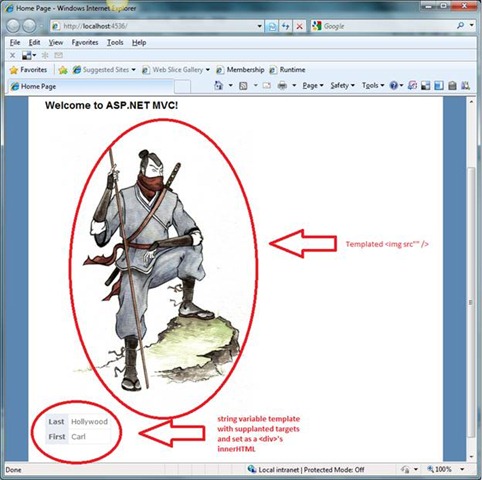
As you can see, we start with a template String and a JSON data Object.  Then we get our target DOM node and simply set its .innerHTML property to the output of the template running its own .supplant() function against the data object.  Very sparse, no heavy framework..  Its just the bare bones Javascript and a helper function.  Here’s an example of using this technique to set the .src property of an <img> DOM node.

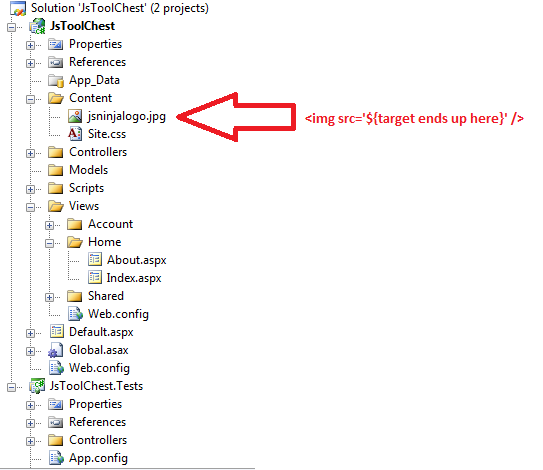
Assuming I have an image file that I want to be targetable based on some script logic, it looks like this.

The code that I need to target this file at runtime looks like this:

            <img id="logo" src="" />

      <script type="text/javascript">


          var param = { domain: ‘memecannon.com’, media: ‘/Content/ninja’ };

          var url = "{media}.jpg".supplant(param);


          var logo = document.getElementById("logo");

          logo.setAttribute("src", url);


    </script>


The output looks like this:

Using this approach, its quite easy to do targeting of custom skin artifacts and layout structures.  Other uses of this approach are to programmatically inject variables into CSS strings and runtime script includes.  As you can see, the basics for screen templating are exposed near the surface of DOM scripting with Javascript.  That said, I do typically use JQuery plugins for this type of screen composition.  I’ve surveyed most of the JQuery plugins in this space.  I recommend JSRepeater for ease of use and support for automatic iterating over collections and dealing with heirarchal data structures.  For an extremely unobtrusive templating solution, you can’t beat NoTemplate.  It provides a level of externalized purity, in that you don’t need to hack replacement ${targets} into your markup at all; rather, it uses selectors to reach down into your markup for mapping data to screen targets. 

Hopefully, in this article I’ve informed, if not convinced you that you have the power to blend your data and markup in whatever ways you need purely with Javascript and with a minimum of effort.  In a successive post,  I’ll show you how to interact this approach with Ajax Services to bring your screens to life.

Enjoy..

Implementing method_missing with C# dynamic – Part 2

In my previous post, Implementing method_missing with C# dynamic – Part 1, I demonstrated a simple approach to plugging a method_missing call routing seam into a DynamicObject.  Here I’ll take it a step further to implement a generic method_missing function capable of passing any call to a forwarding context object.  Note that I do not have to define the method_missing in the calling code; its now automatically setup for me in DynamicObject itself.


[TestMethod]

public void Can_Forward_Through_Default_Missing_Method()

{

    dynamic dispatcher1 = new ExpandableDispatcher();

    dynamic dispatcher2 = new ExpandableDispatcher();

    dynamic dispatcher3 = new ExpandableDispatcher();


    //configure forwarding

    dispatcher1.ForwardContext = dispatcher2;

    dispatcher2.ForwardContext = dispatcher3;


    //set responder on dispatcher3

    dispatcher3.Methods["RunMeta"] = new Func<string, string>(param =>

    {

        return "Meta said " + param;

    });


    //try to execute the responder from dispatcher1

    var response = dispatcher1.RunMeta("I am a probe..");


    Assert.IsTrue(response == "Meta said I am a probe..");

}


The implementation of ExpandableDispatcher contains a DynamicObject reference called ForwardContext.  This handle is for forwarding messages that cannot be responded to by the this in the current execution context.  Note that in the ctor, the dispatcher sets up its own, method_missing.  


public class ExpandableDispatcher : DynamicObject

{

    DynamicObject forwardContext;


    public DynamicObject ForwardContext

    {

        get { return forwardContext; }

        set { forwardContext = value; }

    }


    IDictionary<string, object> _methods = new Dictionary<string, object>();


    public IDictionary<string, object> Methods

    {

        get { return _methods; }

        set { _methods = value; }

    } 


    public ExpandableDispatcher()

    {


        //setup default method_missing

        this._methods["method_missing"] = new Func<DynamicObject, InvokeMemberBinder, object[], object>((contextObject, binder, args) =>

        {


            dynamic context = contextObject;


            var method = context.Methods.ContainsKey(binder.Name) ? context.Methods[binder.Name] : null;

            var method_missing = context.Methods.ContainsKey("method_missing") ? context.Methods["method_missing"] : null;


            if (method != null)

            {

                if (method.ToString().StartsWith("System.Action"))

                {

                    RunAction(method, args);

                }

                else

                {

                    return RunFunc(method, args);

                }

            }

            else if (method_missing != null)

            {

                return method_missing(context.ForwardContext, binder, args);

            }


            return null;

        });

    }


    private object RunFunc(dynamic method, object[] args)

    {

        switch (args.Length)

        {

            case 0:

                return method();

            case 1:

                return method(args[0]);

            case 2:

                return method(args[0], args[1]);

            case 3:

                return method(args[0], args[1], args[2]);

            case 4:

                return method(args[0], args[1], args[2], args[3]);

            case 5:

                return method(args[0], args[1], args[2], args[3], args[4]);

        }

    }


    private void RunAction(dynamic method, object[] args)

    {

        switch (args.Length)

        {

            case 0:

                method();

                break;

            case 1:

                method(args[0]);

                break;

            case 2:

                method(args[0], args[1]);

                break;

            case 3:

                method(args[0], args[1], args[2]);

                break;

            case 4:

                method(args[0], args[1], args[2], args[3]);

                break;

            case 5:

                method(args[0], args[1], args[2], args[3], args[4]);

                break;

        }

    }


    public override bool TryInvokeMember(InvokeMemberBinder binder, object[] args, out object result)

    {

        if (_methods.ContainsKey(binder.Name) && _methods[binder.Name] is Delegate)

        {

            result = (_methods[binder.Name] as Delegate).DynamicInvoke(args);

            return true;

        }

        else if (_methods.ContainsKey("method_missing") && _methods["method_missing"] is Delegate)

        {

            var method_missing = _methods["method_missing"] as Delegate;

            var ctxParam = method_missing.Method.GetParameters().Where(p => p.Position == 0 &&

                                                                        p.ParameterType == typeof(DynamicObject)).FirstOrDefault();

            if (ctxParam != null && forwardContext != null)

            {

                dynamic context = forwardContext;

                result = method_missing.DynamicInvoke(context, binder, args);

                return true;

            }

            else

            {

                result = method_missing.DynamicInvoke(binder, args);

                return true;

            }

        }

        else

        {

            return base.TryInvokeMember(binder, args, out result);

        }

    }

}


For further reading on the topics I discussed and demonstrated in this series, this MSDN article shows a clever approach to creating MethodBags by passing lambda Expressions to a DynamicObject, which are then compiled into Delegates and assigned to to the dynamic itself.  In successive posts, I’ll be exploring the new extensions to the System.Linq.Expressions.Expression API in .NET 4.0.

Enjoy..
Implementing method_missing with C# dynamic – Part 1

One of the neat things about Ruby is its method_missing fallback capability.  Using the C# 4.0 DynamicObject, we’re also able to control dispatch at runtime.  I wanted to see how the method_missing idiom might work with a C# dynamic dispatcher, so I wrote up a small sample.

[TestMethod]

public void Can_Control_Dynamic_Dispatch()

{

    dynamic dispatcher1 = new ExpandableDispatcher();


    dynamic dispatcher2 = new ExpandableDispatcher();


    dispatcher1.Methods["method_missing"] = new Func<string, object>(param =>

    {

        return dispatcher2.RunMeta(param);

    });


    dispatcher2.Methods["RunMeta"] = new Func<string, string>(param =>

    {

        return "Meta said " + param;

    });


    var response = dispatcher1.RunMeta("I am a probe..");


    Assert.IsTrue(response == "Meta said I am a probe..");

}


Note that an attempt to execute RunMeta is made on dispatcher1, but RunMeta is not defined on dispatcher1; its on dispatcher2.  The call gets routed by method_missing to dispatcher2 for execution.  In this simple case, the call is passed from a Delegate in dispatcher1 to one in dispatcher2 via a closure reference set in the calling code.    A more elaborate message passing implementation, however, will allow method_missing to forward the call to a ServiceLocator or back up the call stack until it finds a method with a matching name and signature. 


Here’s the simplest implementation of ExpandableDispatcher.

public class ExpandableDispatcher : DynamicObject

{


       IDictionary<string, object> _methods = new Dictionary<string, object>();

public IDictionary <string, object> Methods

{

    get { return _methods; }

    set { _methods = value; }

}


        public override bool TryInvokeMember(InvokeMemberBinder binder, object[] args, out object result)

        {

            if (_methods.ContainsKey(binder.Name) && (_methods[binder.Name] is Delegate)

            {

                result = (_methods[binder.Name] as Delegate).DynamicInvoke(args);

                return true;

            }

            else if (_methods.ContainsKey("method_missing") && _methods["method_missing"] is Delegate)

            {

                result = (_methods["method_missing"] as Delegate).DynamicInvoke(args);

                return true;

            }

            else

            {

                return base.TryInvokeMember(binder, args, out result);

            }

        }

}


As you can see, dynamic dispatch in C# 4.0 gives us the power to define method calling routes with an emphasis on runtime behavioral composition.  This enables a new family patterns in C# that leverage dynamic message routing using runtime assignment of Delegates to DynamicObject facades.  For more reading on this topic, see the follow up post, Implementing method_missing with C# dynamic – Part 2.

Enjoy..

A Small Javascript To Safely Load Scripts and Styles Into The DOM

Consider scenarios where you have pages composed of parts that are combined at runtime.  If the many authors of those parts have external script references sprinkeled throughout, there is the chance that author2 might over write author1’s reference of JQuery or some other script dependency.  The consequences of doing this are usually breakage.  I wrote this little script to allow all authors to call their scripts into page parts safely, ensuring that a script or stylesheet reference never overwrites another.  This script assumes that URI is sufficient to uniquely identify a script.  It does not attempt to deal with the situation where 2 developers might both load the same library from different URIs.


<!DOCTYPE html PUBLIC "-//W3C//DTD XHTML 1.0 Transitional//EN" "http://www.w3.org/TR/xhtml1/DTD/xhtml1-transitional.dtd"&gt;

<html xmlns="http://www.w3.org/1999/xhtml"&gt;

<head>

    <title></title>

    <script type="text/javascript">


        /**

        * Function object to carry DOM management behaviors

        */

        function bootStrapper() {


            var head = document.getElementsByTagName("head")[0];


            /**

            * Loads an external javascript source by creating a <script> tag

            * and injecting it into the DOM.

            * @param {string} src Url of the content uri

            * @param {string} opt_id An optional id for the <script> tag

            */

            this.addScriptReference = function (url, opt_id) {

                if (!isLoaded(head, ‘script’, ‘src’, url)) {

                    var script = document.createElement(‘script’);

                    if (opt_id)

                        script.id = opt_id;

                    script.type = ‘text/javascript’;

                    script.src = url;

                    head.appendChild(script);

                }

            };


            /**

            * Loads an external style source by creating a <link> tag

            * and injecting it into the DOM.

            * @param {string} src Url of the content uri

            * @param {string} opt_id An optional id for the <link> tag

            */

            this.addStyleReference = function (url, opt_id) {

                if (!isLoaded(head, ‘link’, ‘href’, url)) {

                    var style = document.createElement(‘link’);

                    if (opt_id)

                        style.id = opt_id;

                    style.href = url;

                    style.rel = "stylesheet";

                    style.type = "text/css";

                    head.appendChild(style);

                }

            };


            /**

            * Tests to see if tag with matching key and value properties is

            * present in container

            * @param {DOM Node} container dom element to search

            * @param {string} name of the tag to be searched for

            * @param {string} name of the attribute of belonging to the tag

            * @param {string} value of the attribute of belonging to the tag

            */

            function isLoaded(container, tagName, propKey, propValue) {

                var elems = container.getElementsByTagName(tagName);


                var alreadyLoaded = false;

                for (var i = 0, elem; elem = elems[i]; i++) {

                    if (elem[propKey] == propValue) {

                        alreadyLoaded = true;

                        break;

                    }

                }

                return alreadyLoaded;

            };

        }


    </script>


    <script type="text/javascript">


        var boot = new bootStrapper();


        //redundant script

        boot.addScriptReference(http://ajax.googleapis.com/ajax/libs/jquery/1/jquery.min.js&#8217;, "jQuery1");

        boot.addScriptReference(http://ajax.googleapis.com/ajax/libs/jquery/1/jquery.min.js&#8217;, "jQuery2");


        //redundant style

        boot.addStyleReference(http://www.codeweblog.com/template/andy/css/style.css&#8217;, "Style1");

        boot.addStyleReference(http://www.codeweblog.com/template/andy/css/style.css&#8217;, "Style2");


    </script>


</head>

<body>


    <p>Example Usage…</p>


</body>

</html>


The result of the above usage is that only 1 instance of the Javascript and only 1 instance of the stylesheet is loaded.  

Property Copying With Dynamic Objects in .NET 4.0

Lately, I’ve been trying out some of the new .NET 4.0 language features.  Specifically, I’ve been looking into ways to trivially combine late dispatch and late binding in order to build general purpose convenience objects.   In this case, I wanted an expando object that I could program against with some of the techniques we use in javascript to programmatically build up a graph’s shape with runtime logic.   The built in System.Dynamic.ExpandoObject was not sufficient for this purpose, in that it does not provide a mechanism for setting property names at runtime via string, not to mention its sealed.   In this post I’ll quickly show you how to leverage C# dynamic to copy and replicate the shape and values of a POCO at runtime.  By exposing a subclassed DynamicObject’s properties publicly via a Dictionary<string, object>, we can do things like this:
 

        [TestMethod]

        public void Can_Set_Get_Properties()

        {

            dynamic expandable = new ExpandableObject();


            expandable.Properties.Add("foo", "good stuff");


            Assert.AreEqual(expandable.foo, expandable.Properties["foo"]);


            expandable.bar = "yummy";


            Assert.AreEqual(expandable.bar,  expandable.Properties["bar"]);

        }

 
With a few helper methods this capability becomes more useful.  See here:
 

        [TestMethod()]

        public void Expandable_Object_Can_Copy_Properties_From_To()

        {

            dynamic expandable = new ExpandableObject();


            var testObj = new TestObject

            {

                ID = 1,

                Description = "ASDFASDF",

                Name = "GGGG",

                UnitPrice = 6

            };


            expandable.CopyPropertiesFrom(testObj, null);


            Assert.AreEqual(expandable.Description, testObj.Description);


            var testObj2 = new TestObject();


            expandable.CopyPropertiesTo(testObj2, null); 


            Assert.AreEqual(testObj, testObj2);

        }


Here is the implementation of ExpandableObject.


    public class ExpandableObject : DynamicObject

    {

        Dictionary<string, object>

          _properties = new Dictionary<string, object>();


        public Dictionary<string, object> Properties

        {

            get { return _properties; }

            set { _properties = value; }

        }


        public override bool TrySetMember(SetMemberBinder binder, object value)

        {

            _properties[binder.Name] = value;

            return true;

        }


        public override bool TryGetMember(GetMemberBinder binder,

            out object result)

        {

            return _properties.TryGetValue(binder.Name, out result);

        }


        public void CopyPropertiesFrom(object source, List<string> ignoreList)

        {

            ignoreList = ignoreList ?? new List<string>();


            foreach (var property in source.GetType().GetProperties().Where(p => p.CanRead))

            {

                var key = property.Name;

                if (!ignoreList.Contains(key))

                {

                    var value = property.GetValue(source, null);

                    this.Properties[key] = value;

                }

            }

        }


        public void CopyPropertiesTo(object destination, List<string> ignoreList)

        {

            ignoreList = ignoreList ?? new List<string>();


            var destProps = destination.GetType().GetProperties().ToList();

            this.Properties.Keys.ToList().ForEach(key =>

            {

                if (!ignoreList.Contains(key))

                {

                    var value = this.Properties[key];


                    var property = destProps.Where(p => p.CanWrite &&

                                                   p.Name == key &&

                                                   p.PropertyType == value.GetType()).FirstOrDefault();

                    if (property != null)

                    {

                        property.SetValue(destination, value, null);

                    }

                }

            });

        }

    }


There is no spoon…


Enjoy…

Using JQuery With WebForms Controls

The scenario:  We have an ASP.NET CheckListBox from which we want to ensure at least one option has been selected before allowing the user to click a button.  Sounds simple enough, but we’re going to use JQuery to do all of this work on the client. 


ASP.NET MARKUP:

<%@ Control Language="C#" AutoEventWireup="true" CodeBehind="FileDownloadUserControl.ascx.cs" Inherits="FileDownloadUserControl" %>

<asp:CheckBoxList ID="chklstFilesAvailable" runat="server">

<asp:Button style="display: none" ID="btnDownload" runat="server" Text="Download" OnClick="btnDownload_Click" />


Simple and straightforward..  Now lets have a look at the HTML that this code results in.  With three items bound to our CheckListBox, we get this:


RENDERED HTML MARKUP:

<table id="ctl0_FileDownloadUserControl1_chklstFilesAvailable" border="0">

<tr><td>

<input id="ctl0_FileDownloadUserControl1_chklstFilesAvailable_0" type="checkbox" name="ctl0$FileDownloadUserControl1$chklstFilesAvailable$0" />

<label for="ctl0_FileDownloadUserControl1_chklstFilesAvailable_0">BLAH1_20090608.csv</label>

</td></tr>

<tr><td>

<input id="ctl0_FileDownloadUserControl1_chklstFilesAvailable_1" type="checkbox" name="ctl0$FileDownloadUserControl1$chklstFilesAvailable$1" />

<label for="ctl0_FileDownloadUserControl1_chklstFilesAvailable_1">BLAH2_20090608.csv</label>

</td></tr>

<tr><td>

<input id="ctl0_FileDownloadUserControl1_chklstFilesAvailable_2" type="checkbox" name="ctl0$FileDownloadUserControl1$chklstFilesAvailable$2" />

<label for="ctl0_FileDownloadUserControl1_chklstFilesAvailable_2">BLAH1_20090608.csv</label>

</td></tr>

</table>

<input type="submit" name="btnDownload" value="Download" id="btnDownload" />


WebForms has created a table, labels, and checkboxes.  Note that the IDs have been changed from the original names we gave them.  We have effectively lost control of our ID naming at this point.  This makes it difficult to use JavaScript to target these elements after they’ve been rendered.  Here is a workaround to target the CheckListBox and the Button post render.

First we get the mangled IDs and use those values in JQuery selectors to create JQuery objects.  Then we pass them as parameters to the wireButtonShowToCheckListBox function in order to wire the click event of each checkbox to a nested anonymous function, which checks to see if at least one of the boxes are checked and, if so, shows the button.


JAVASCRIPT:

<script type="text/javascript" language="javascript">


    $(document).ready(function() {

        var id = "<%= chklstFilesAvailable.ClientID %>";

        var chklist = $("#" + id);


        var btnId = "<%= btnDownload.ClientID %>";

        var button = $("#" + btnId);


        //reusable show/hide button wiring

        wireButtonShowToCheckListBox(chklist, button);

    });


function wireButtonShowToCheckListBox(chklist, button) {

    chklist.find(‘input:checkbox’).each(function() {

        var cb = $(this);

        cb.click(function() {


            var hit = false;

            chklist.find(‘input:checkbox’).each(function() {

                var checked = $(this).attr(‘checked’);

                if (checked)

                    hit = true;

            });


            if (hit == true) {

                button.show();

            } else {

                button.hide();

            }

        });

    });

}


</script>


Thats it.. With this approach we can pass any CheckListBox and any Button to this function and achieve a very fast pure client-side solution to control when and if the user can click the button.  The same basic approach can be used to target and wire other rendered WebForms controls.  Enjoy..